Introduction
Scaling a system to support millions of users is a complex, iterative journey requiring refinement and optimization. This chapter outlines how to begin with a single server setup and scale the architecture step by step to handle millions of users.
Section 1: Single Server Setup
Initially, all components (web app, database, cache) run on a single server.
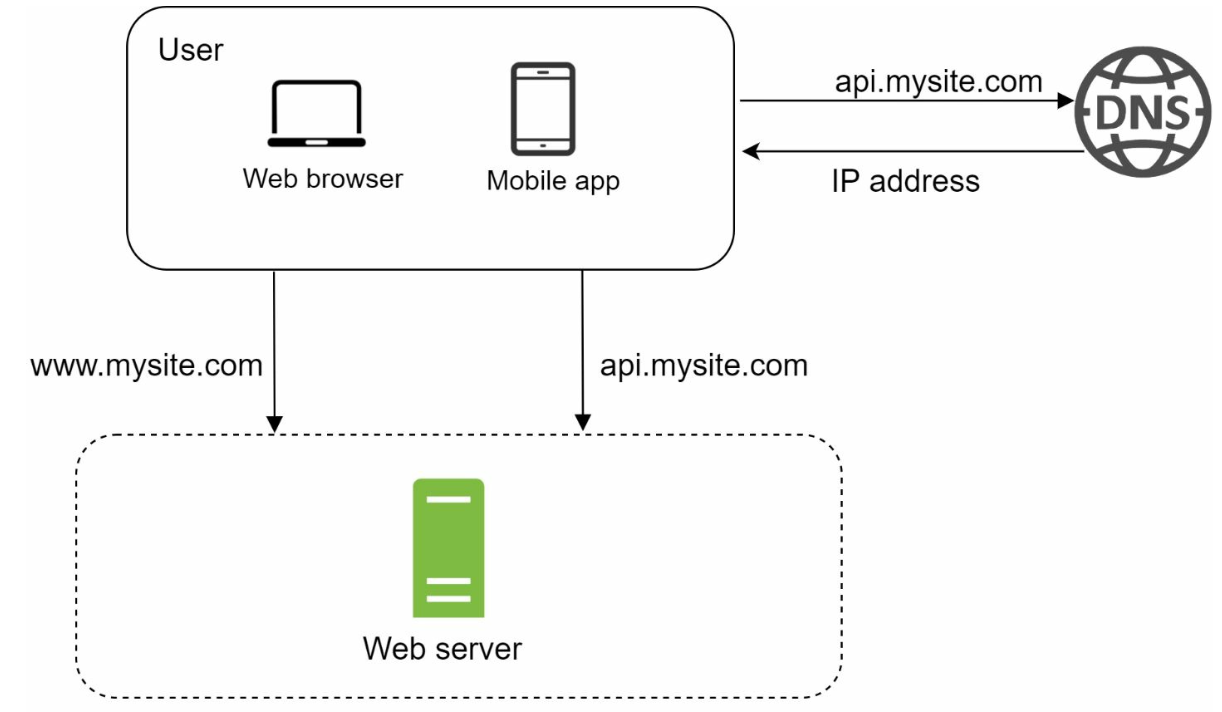
Request Flow
- Users access the application via domain names (e.g.,
api.mysite.com), resolved to IP addresses using DNS. - IP address of the web-server is returned to the browser or mobile app.
- HTTP requests are sent to the web server, which returns HTML or JSON responses.
Traffic Sources
- Web Applications: Use server-side languages (e.g., Python, Java) for business logic and client-side languages (e.g., JavaScript, HTML) for presentation.
- Mobile Applications: Communicate with the web server using HTTP and JSON for lightweight data exchange.
Section 2: Database Separation
As the user base grows, the database is moved to a dedicated server to allow independent scaling of web and database tiers.
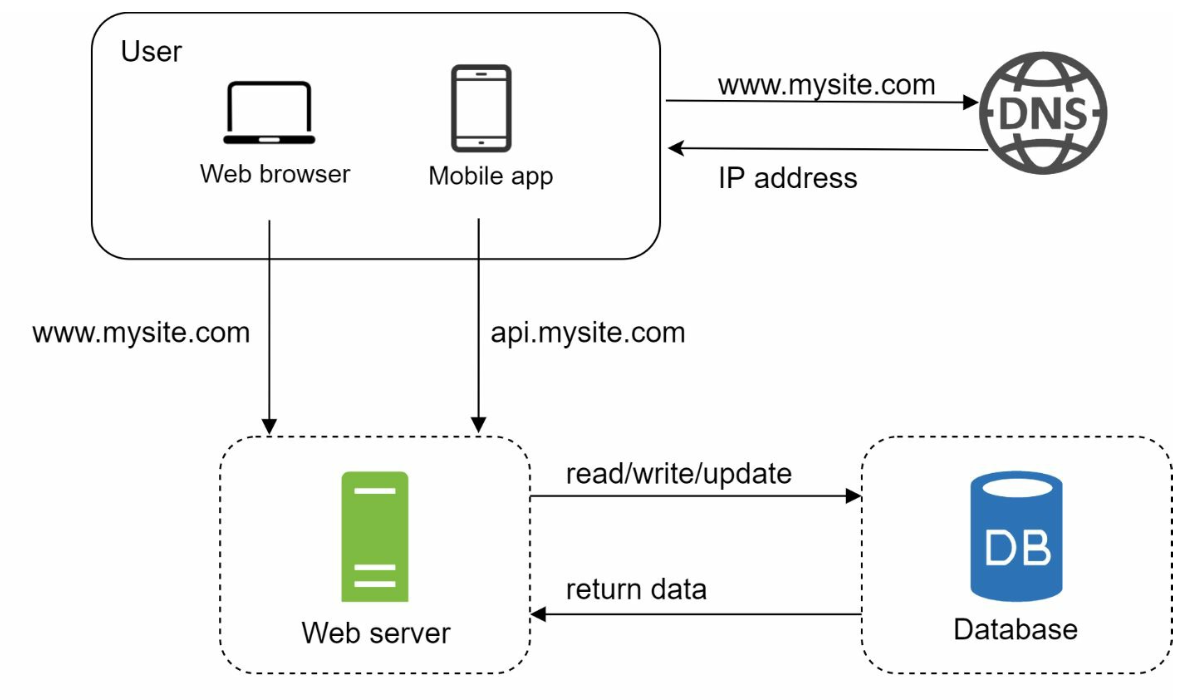
Database Choices
- Relational Databases (SQL): Structured data stored in tables. Examples: MySQL, PostgreSQL.
- Non-Relational Databases (NoSQL): Suitable for unstructured data or low-latency requirements. Categories include:
- Key-Value Stores
- Graph Databases
- Column Stores
- Document Stores
- Non-relational databases might be the right choice if:
- application requires super-low latency.
- data is unstructured, or there is no relational data.
- only need to serialize and deserialize data (JSON, XML, YAML, etc.).
- need to store a massive amount of data.
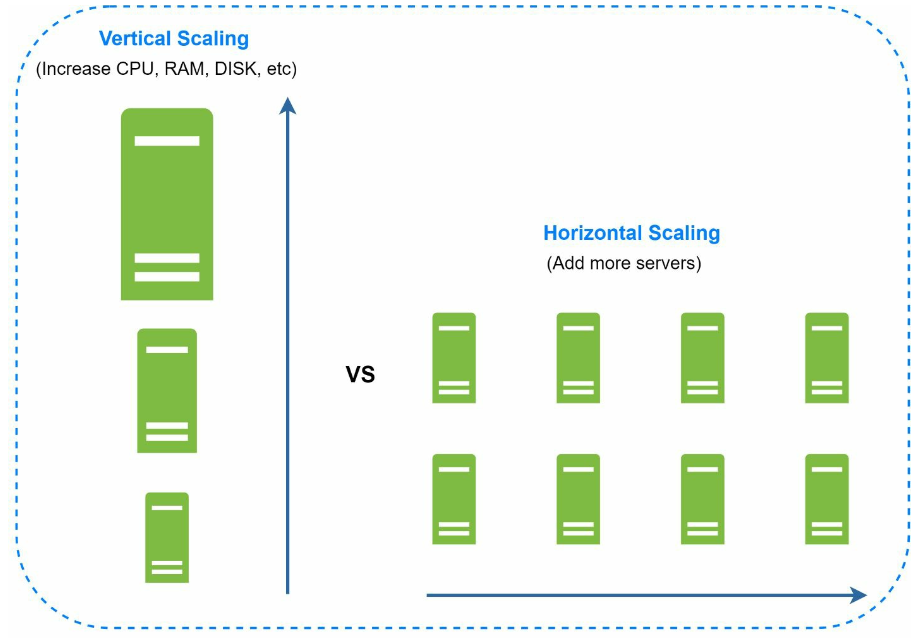
Section 3: Vertical vs Horizontal Scaling
Vertical Scaling
- Adds more resources (CPU, RAM) to existing servers.
- Limited by hardware constraints and lacks redundancy.
Horizontal Scaling
- Adds more servers to the pool, making it more suitable for large-scale systems.
- A load balancer is used to handle the request routing between the servers.
Section 4: Load Balancer
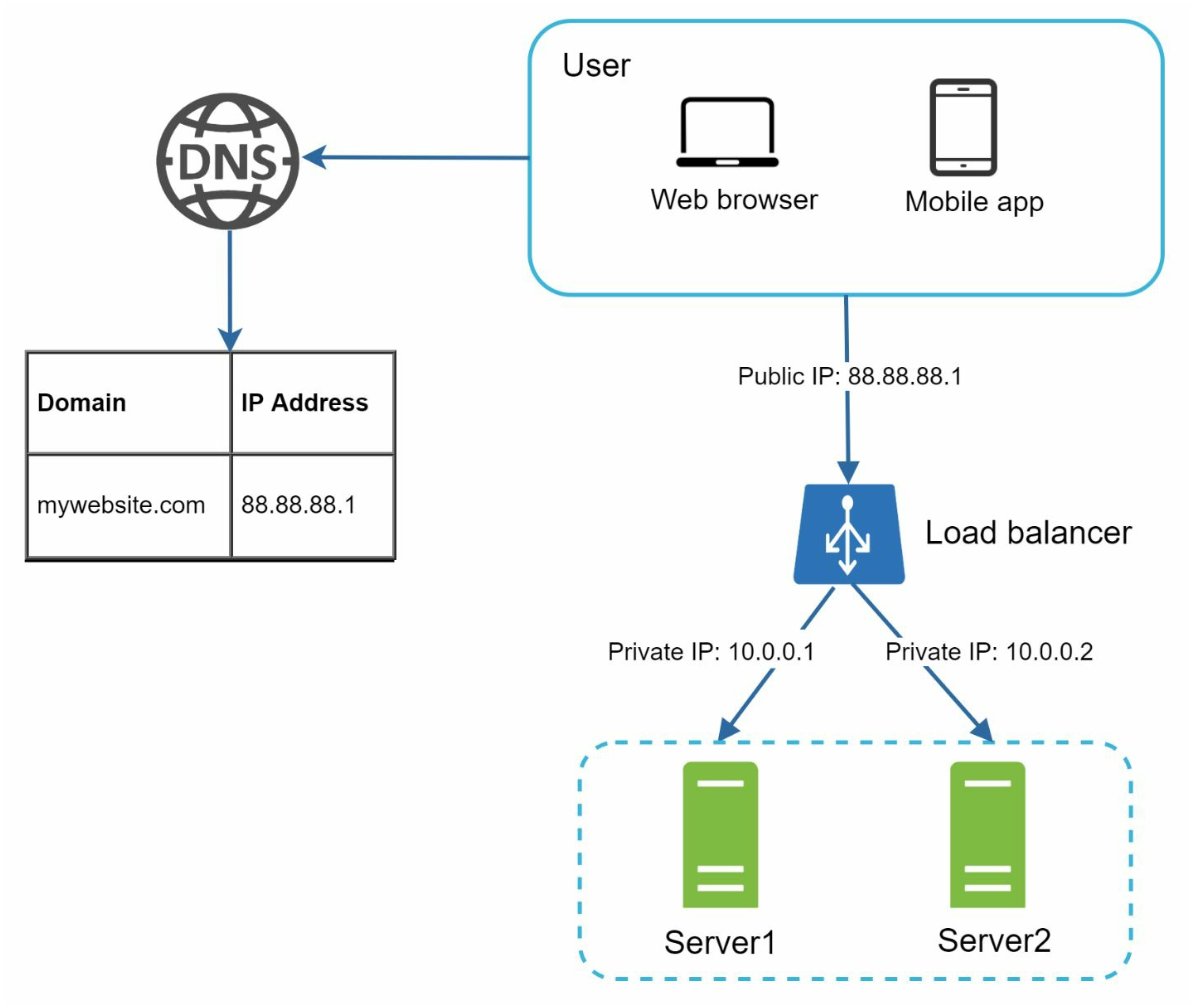
A load balancer distributes traffic among multiple servers. Benefits include:
- Redundancy: If a server goes offline, traffic is rerouted.
- If server 1 goes offline, all the traffic will be routed to server 2.
- Scalability: Easily add servers to handle traffic spikes.
- If the website traffic grows rapidly, subsequent servers can be added to handle the additional traffic.
Section 5: Database Replication
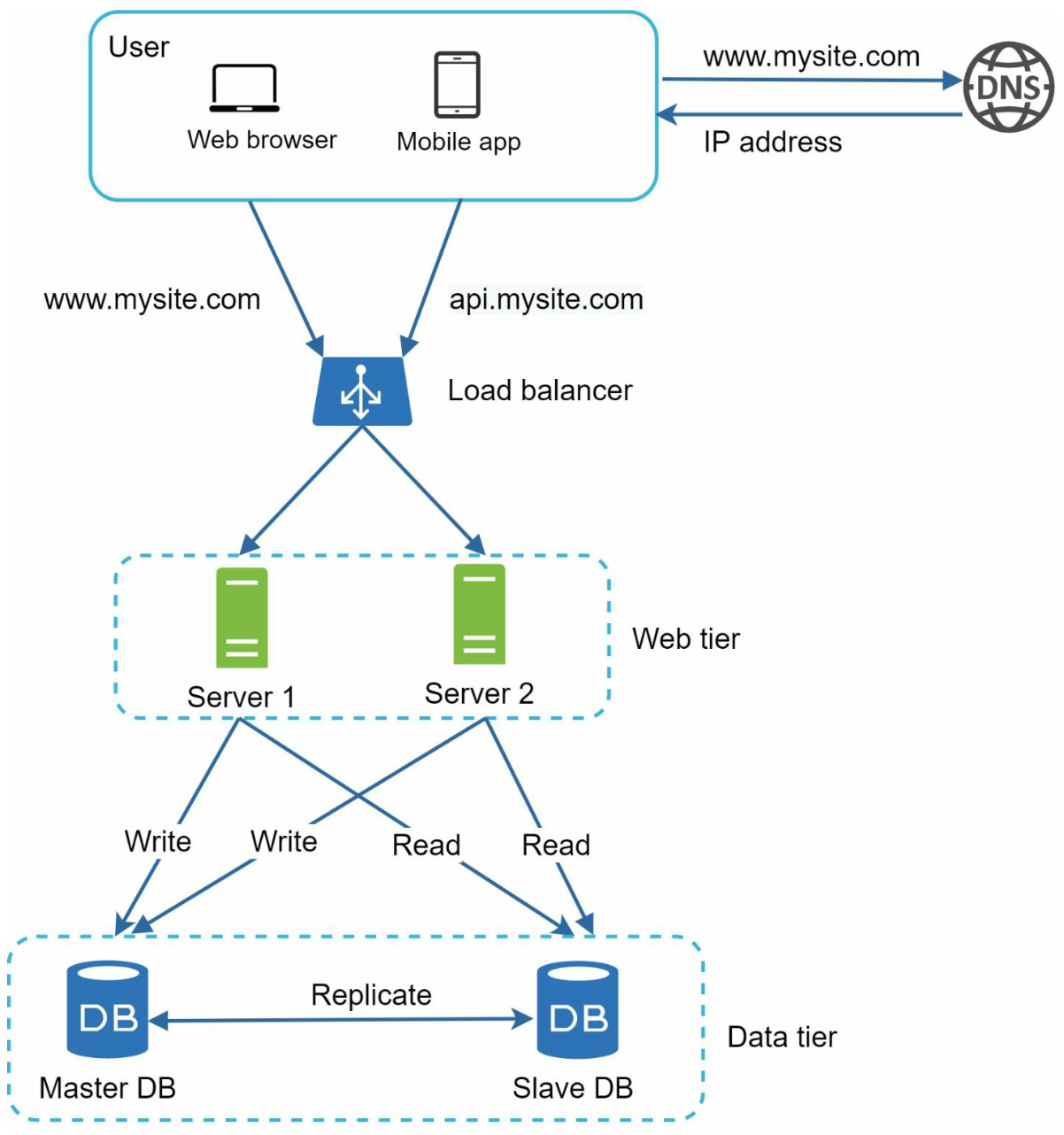
Master-Slave Model
- Master Database: Handles write operations.
- All the data-modifying commands like insert, delete, or update must be sent to the master database.
- Slave Databases: Handle read operations, improving performance and reliability.
- Since the ratio of reads to writes is higher in most applications; thus, the number of slave databases in a system is usually larger than the number of master databases.
Benefits
- Improved performance through parallel read operations.
- High availability and data reliability through redundancy.
Failure Handling
- If only one slave database is available and it goes offline, read operations will be directed to the master database temporarily.
- In case multiple slave databases are available, read operations are redirected to other healthy slave databases and a new server will replace the old one.
- If the master database goes offline, a slave database will be promoted to be the new master.
- In production system the chosen slave database might not be up to date, hence data needs to be updated by running data recovery scripts (methods like multi-masters and circular replication could help).
Section 6: Caching
A cache stores frequently accessed data in memory to reduce database load. The cache tier is a temporary data store layer, much faster than the database.

Caching considerations
- Use case: Consider using cache when data is read frequently but modified infrequently.
- Expiration Policies: Once cached data is expired, it is removed from the cache. When there is no expiration policy, cached data will be stored in the memory permanently.
- Consistency: This means keeping the data store and the cache in sync. Inconsistency can happen because data-modifying operations on the data store and cache are not in a single transaction.
- Mitigating failures: A single cache server represents a potential single point of failure, multiple cache servers across different data centers are recommended to avoid SPOF.
- Eviction Policies:: Once the cache is full, items need to be evicted to free up memory. LRU is the most popular cache eviction policy.
Section 7: Content Delivery Network (CDN)
A CDN improves load times by caching static content (images, CSS, JavaScript) on geographically distributed servers.
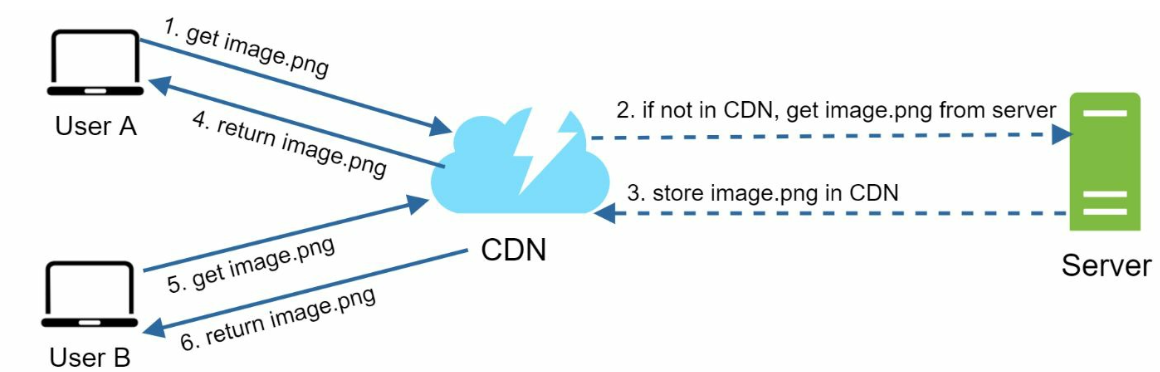
Workflow
- User requests content from the nearest CDN server.
- If unavailable, content is fetched from the origin server and cached.
CDN considerations
- Cost: CDNs are run by third-party providers which charge for data transfers in and out of the CDN.
- Cache Expiry: The cache expiry time should neither be too long nor too short.
- CDN fallback: If there is a temporary CDN outage, clients should be able to detect the problem and request resources from the origin.
- Invalidating files: If files are updated the cache should be invalidated to point to the updated files.
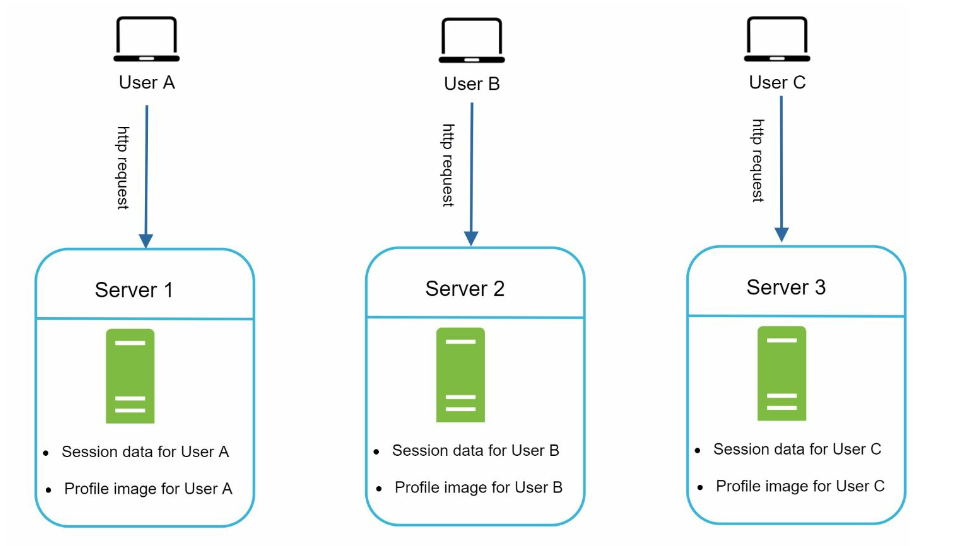
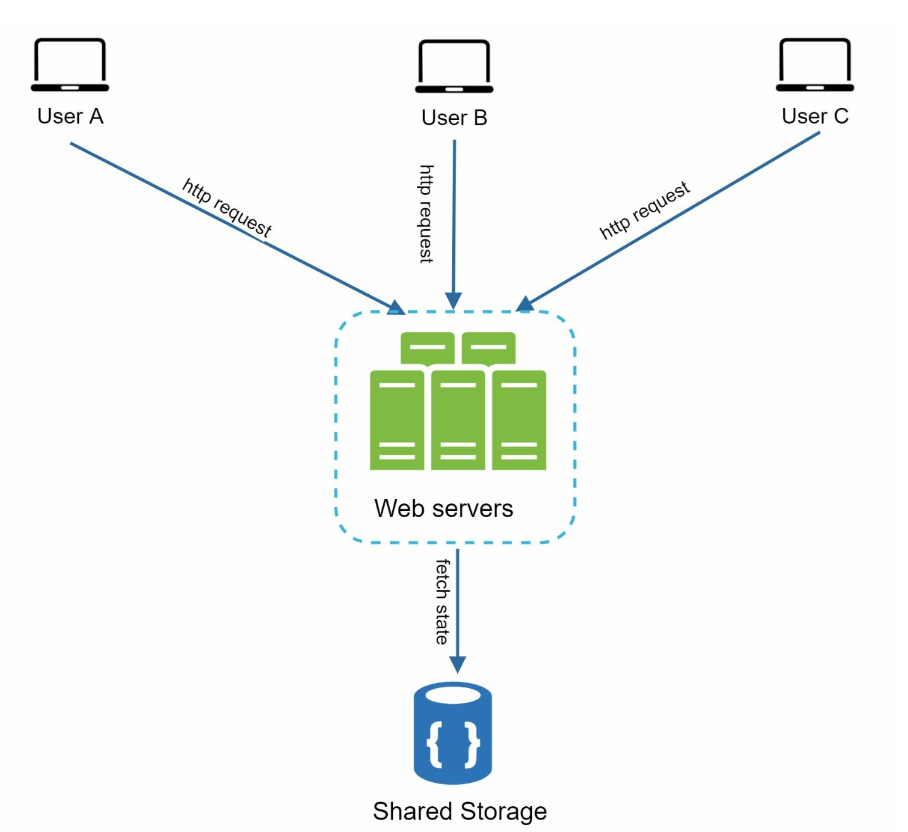
Section 8: Stateless Web Tier
By moving session data to a shared datastore, web servers become stateless. This allows:
- Easier horizontal scaling.
- Auto-scaling based on traffic.
Section 9: Multi-Data Center Setup
Deploying across multiple data centers improves availability and reduces latency. Strategies include:
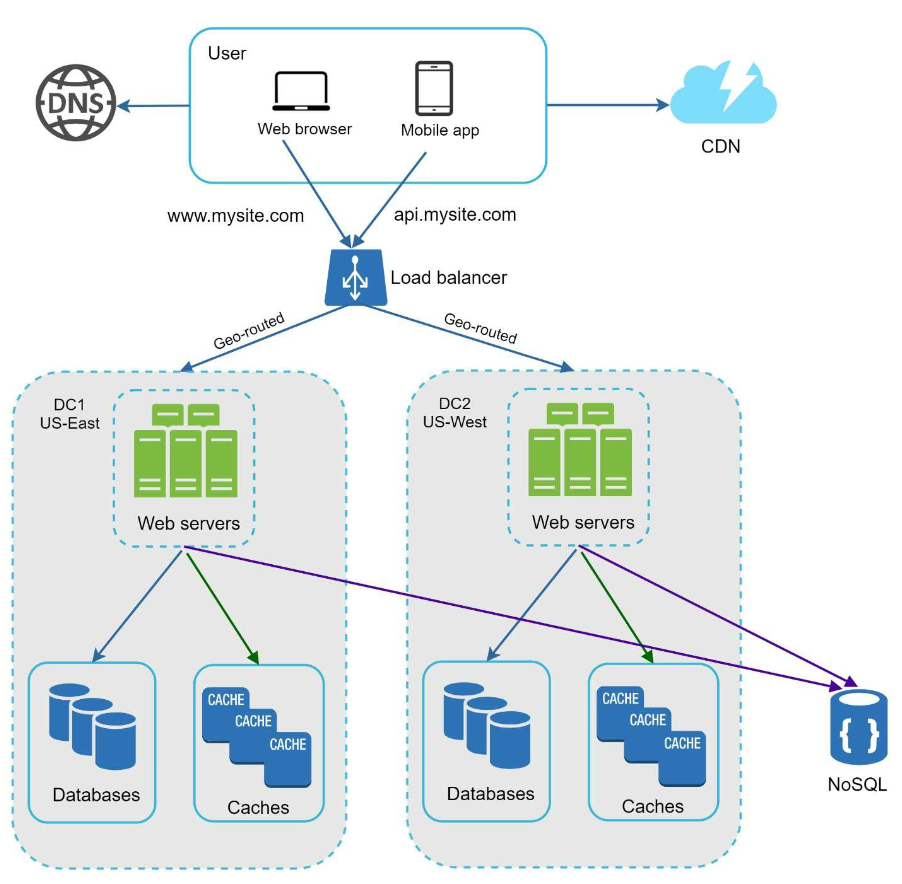
- GeoDNS Routing: Direct users to the nearest data center.
- Data Replication: Synchronize data across centers to prevent inconsistencies.
Key considerations
- Traffic redirection: Effective tools are needed to direct traffic to the correct data center.
- Data synchronization: A common strategy is to replicate data across multiple data centers.
- Test and deployment: Automated deployment tools are vital to keep services consistent through all the data centers.
Section 10: Message Queue
A message queue is a durable component, stored in memory, that supports asynchronous communication. It serves as a buffer and distributes asynchronous requests.
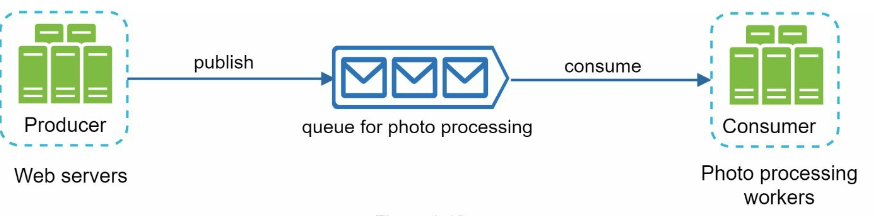
- Input services, called producers/publishers, create messages, and publish them to a message queue.
- Other services called consumers/subscribers, connect to the queue, and perform actions defined by the messages.
Section 11: Logging, Metrics, and Automation
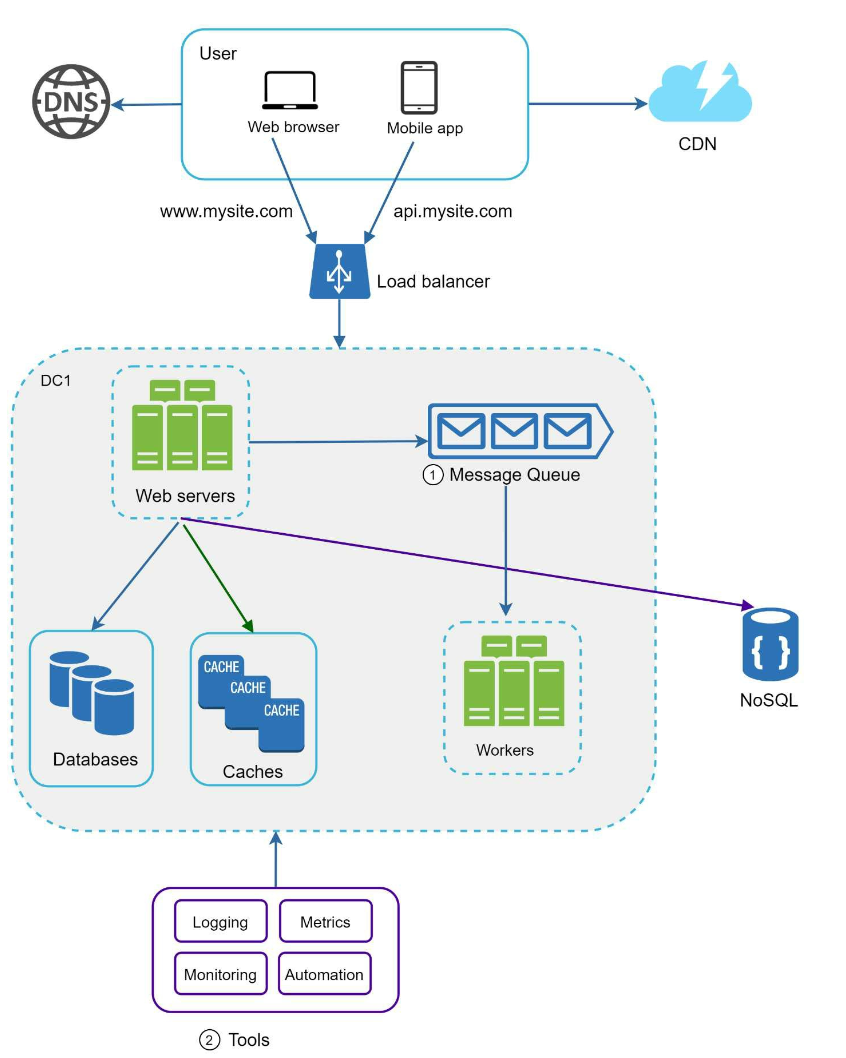
Importance
- Logging: Tracks errors and system health.
- Metrics: Provides insights into performance and user activity.
- Automation: Streamlines testing, deployment, and scaling.
Section 12: Database Scaling
Vertical Scaling
- Adds hardware resources but has physical and cost limitations.
- Has multiple drawbacks:
- Greater risk of single point of failures.
- Overall cost of vertical scaling is high
Horizontal Scaling (Sharding)
- Divides data across multiple shards using keys (e.g.,
user_id).- Sharding separates large databases into smaller, more easily managed parts called shards.
- Each shard shares the same schema, though the actual data on each shard is unique to the shard.
- Sharding key is critical when implementing a sharding strategy. When choosing a sharding key it is important to choose a key that can evenly distribute data.
Challenges
Resharding data: Resharding data is needed when:
- Single shard could no longer hold more data due to rapid growth.
- Certain shards might experience shard exhaustion faster than others due to uneven data distribution.
- Consistent Hashing is used to overcome these problems
Celebrity problem: Excessive access to a specific shard could cause server overload.
- To solve this problem, we may need to allocate a shard for each celebrity.
Join and de-normalization: Once a database has been sharded across multiple servers, it is hard to perform join operations across database shards.
- A common workaround is to de-normalize the database so that queries can be performed in a single table.
Conclusion
Key Takeaways
- Keep the web tier stateless.
- Build redundancy at every tier.
- Use caching and CDNs to optimize performance.
- Scale the data tier with sharding.
- Decouple components for flexibility.
This chapter provides a solid foundation for building scalable systems that can handle millions of users.